

Getting more clicks from Google Ads does not always mean your business is getting more customers.
A campaign might generate website traffic, but enquiries may remain low. In another situation, leads might come in, but the sales team may struggle to convert them into customers.
So, should you increase the advertising budget whenever a campaign generates more clicks?
I would not make that decision based on clicks alone.
Before increasing a Google Ads budget, I prefer to understand what happens after users visit the website. This is where Google Analytics 4 (GA4) becomes useful.
In this article, I will explain the GA4 reports I would check, what I look for in the data, and how those observations can help me make better Google Ads decisions.
1. First, I Check Traffic Acquisition in GA4
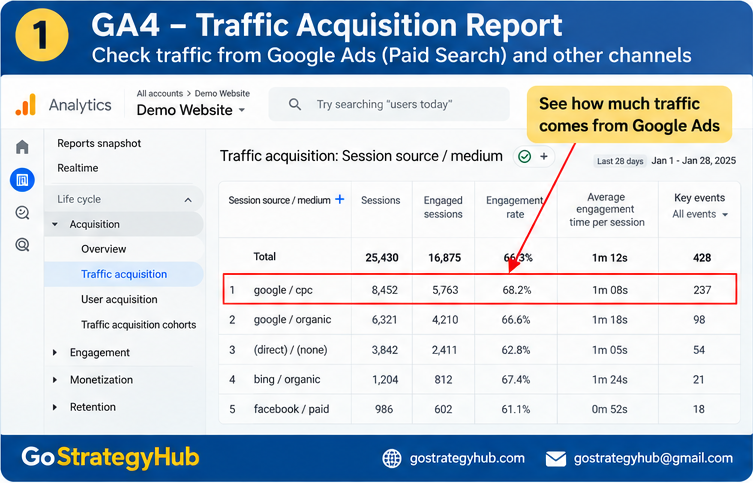
The first report I would review is Traffic acquisition.
You can find it under Reports → Acquisition → Traffic acquisition in GA4. The exact report layout may vary depending on your property and reporting configuration.
This report helps me understand how users arrive at the website, including through paid search, organic search, direct traffic, and other channels.
Here are some of the metrics I would review:
Sessions
Engaged sessions
Engagement rate
Average engagement time per session
Key events, where configured
I would also review the session source and medium to understand where the traffic comes from.
What am I looking for?
Suppose a Google Ads campaign generates website visits, but users show limited engagement.
I would not immediately conclude that the audience is wrong or that the campaign should be stopped.
Instead, I would investigate a few questions:
Are the search terms relevant to the product or service?
Does the advertisement match the landing page?
Are users finding the information they expected?
Does the page load properly on mobile devices?
Are important actions being tracked correctly?
Traffic acquisition helps me identify where to investigate. It does not automatically explain why users behave in a particular way.
2. Next, I Check Landing Page Performance
A campaign can attract relevant visitors and still struggle to generate enquiries or purchases.
That is why I would look at the landing pages receiving traffic.
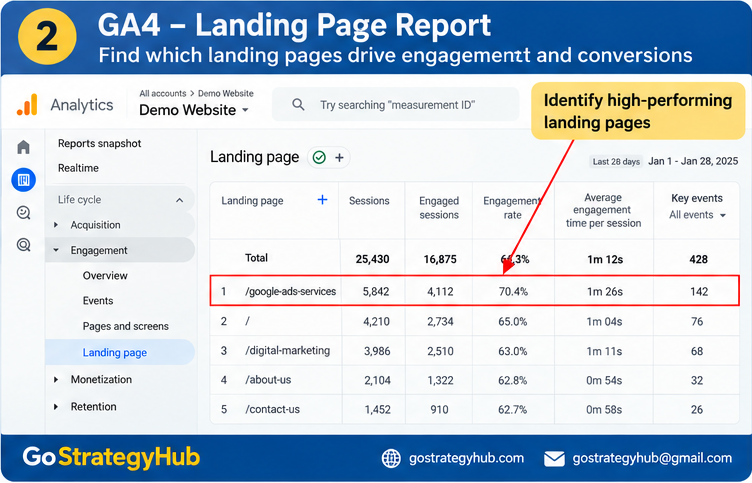
In GA4, I would review the Landing page report, available under the Engagement reports when the relevant report is included in the property.
I would compare landing pages using metrics such as sessions, engagement, and key events.
For example, imagine two landing pages receive traffic from paid campaigns.
Page A attracts visitors but generates very few enquiries.
Page B attracts a similar number of visitors and generates more enquiries.
This is a hypothetical example, not a claim about an actual campaign.
The difference could relate to the offer, page content, form length, pricing information, mobile experience, or audience intent.
Before changing the advertising budget, I would investigate these factors.
What would I check on the landing page?
Does the headline clearly explain the offer?
Is the page relevant to the advertisement?
Can visitors understand the product or service quickly?
Is the call-to-action easy to find?
Does the form work correctly on mobile?
Is there enough information to help users make a decision?
Sometimes, the next improvement is not another audience or a higher bid. It may be fixing the page where potential customers arrive.
3. I Verify Whether Important Actions Are Being Tracked
This is one of the checks I would not skip.
If GA4 does not record important customer actions correctly, the report may give an incomplete picture of website performance.
For a lead generation business, relevant actions might include:
Successful form submissions
Qualified enquiry requests
Important booking actions
Clicks on contact buttons, when useful and properly configured
For an ecommerce business, I would also check relevant events such as add_to_cart, begin_checkout, and purchase.
However, a button click is not necessarily a completed lead or purchase. The tracking setup should reflect the actual business action wherever possible.
How do I check this?
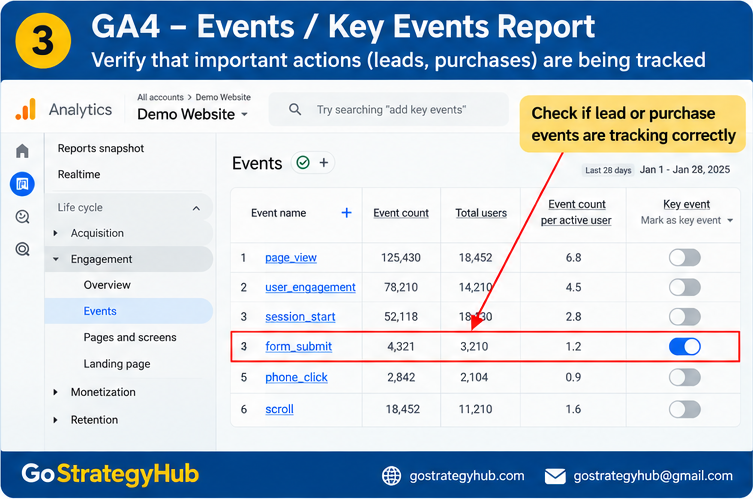
I would review the Events and Key events sections in GA4 to confirm that the relevant events are being recorded.
I would also test the website’s conversion journey and use DebugView or the available real-time reporting tools to investigate whether events fire as expected.
For Google Ads campaigns, I would separately verify the Google Ads conversion actions and their configuration.
Important: GA4 key events and Google Ads conversions are related concepts, but they are not automatically identical. Their numbers can differ because of tracking configuration, attribution, counting methods, and reporting windows.
If a business is receiving enquiries but the analytics reports show no conversions, I would investigate the measurement setup before assuming that the advertising campaign is failing.
4. I Compare Engagement With Actual Business Results
Engagement is useful, but it is not the final business objective.
A user can spend several minutes on a website without submitting an enquiry. Another user may find the required information quickly and complete a purchase.
That is why I would avoid judging campaign quality using engagement rate alone.
Instead, I would compare website behaviour with meaningful outcomes, including:
Leads generated
Cost per lead
Qualified leads
Purchases
Cost per acquisition
Revenue and return on ad spend, where reliable value tracking is available
For lead generation campaigns, I would also want to understand what happens after a form submission.
Are the leads relevant? Are they answering calls? Are they progressing into sales opportunities?
GA4 can help analyse website behaviour, but CRM and sales data may be needed to understand lead quality and actual revenue.
The objective is to connect advertising activity with business outcomes rather than optimising for website visits alone.
5. I Review Search Console Alongside GA4
Google Search Console and GA4 answer different questions.
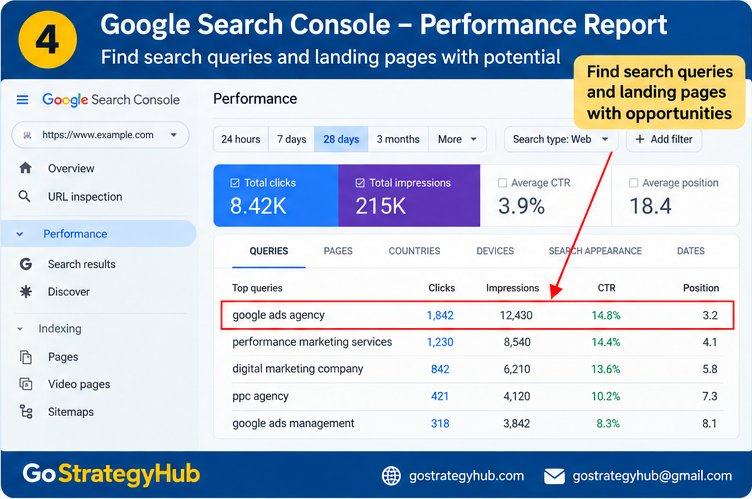
Search Console helps me understand how a website performs in Google organic search. GA4 helps me analyse user activity after visitors reach the website.
For example, Search Console may reveal that a page receives impressions for relevant search queries but has a low click-through rate.
That could be an opportunity to review the page title, search intent, and organic search snippet.
GA4 can then help me investigate how visitors interact with that landing page.
I would not treat organic search performance as direct evidence that a paid keyword will perform well. Organic and paid traffic can have different positions, intent, costs, and user behaviour.
However, using both tools can provide additional context when reviewing website content and landing page opportunities.
6. When Would I Actually Increase the Google Ads Budget?
After reviewing the data, I would consider increasing the budget only when the broader performance picture supports that decision.
I would ask:
Is conversion tracking working correctly?
Are campaigns generating meaningful conversions?
Is the cost per lead or acquisition acceptable for the business?
Are leads relevant and progressing through the sales process?
Can the business handle additional enquiries or orders?
Is there enough evidence to justify spending more?
If the campaign receives clicks but generates few conversions, I would first investigate search intent, ad messaging, the landing page, and tracking.
If conversions are coming in at an acceptable cost and the business is receiving quality leads or profitable purchases, increasing the budget may be worth testing.
Even then, I would scale carefully and monitor the results rather than assuming that doubling the budget will double sales.
There is no universal GA4 engagement rate or conversion threshold that guarantees a campaign is ready to scale. The decision depends on the business model, margins, sales cycle, tracking quality, and campaign results.
Conclusion
Before increasing a Google Ads budget, I want to understand more than how many clicks the campaign generates.
I want to know where the traffic comes from, which landing pages visitors use, whether important actions are tracked correctly, and whether those actions contribute to business results.
GA4 helps me investigate website behaviour. Google Search Console adds insight into organic search visibility. Google Ads and CRM data help complete the picture.
The important lesson is simple: more traffic is not automatically better performance.
The goal is to attract the right visitors, convert them into meaningful enquiries or purchases, and understand which marketing activities contribute to business growth.
At GoStrategyHub, our approach to performance marketing goes beyond running advertisements. Campaign structure, tracking, landing pages, lead quality, and conversion optimisation all matter when building a more measurable marketing system.
If you are looking for a performance marketing agency in Mumbai, visit GoStrategyHub to learn more about our approach to Google Ads and performance marketing.
