

Meta Ads audience targeting is one of the most important parts of running successful Facebook and Instagram advertising campaigns.
Many business owners think that running Meta Ads means selecting an age group, choosing a few interests, setting a budget, and publishing an advertisement.
But that is not how a profitable campaign should be planned.
You can have a good product, attractive creatives, and a decent advertising budget, but if your ads reach people who are unlikely to purchase, you will waste money.
The real goal of audience targeting is not to reach more people. It is to reach people who have a genuine possibility of becoming your customers.
In this guide, we will understand how audience targeting works in Meta Ads, the different types of audiences, how to create them, and which targeting strategy businesses should use with practical examples.
Table of Contents
- What is audience targeting in Meta Ads?
- Why is audience targeting important?
- Types of audience targeting in Meta Ads
- How to create an audience in Meta Ads
- Practical example of audience targeting
- Which audience targeting strategy works best?
- Common audience targeting mistakes
- How to improve Meta Ads audience performance
- Final thoughts
1. What Is Audience Targeting in Meta Ads?
Audience targeting means selecting the people who should see your advertisements on Facebook and Instagram.
Meta provides different targeting options that help advertisers reach people based on their interests, demographics, behaviours, location, and previous interactions with a business.
For example, imagine you own an online skincare brand.
Would you show your advertisement to everyone?
Probably not.
You would prefer to reach people who are interested in skincare, beauty products, personal care, and related products.
You can use audience targeting to help Meta identify these potential customers.
However, targeting is not limited to selecting interests. You can also reach people who have already visited your website, engaged with your Instagram account, or purchased from your business.
2. Why Is Audience Targeting Important?
Audience targeting helps businesses use their advertising budgets more effectively.
Here are some important benefits:
1. Reach relevant customers
Your advertisements can reach people who are more likely to be interested in your products or services.
2. Reduce unnecessary spending
You can avoid spending too much of your budget on audiences that have little connection with your business.
3. Improve lead quality
For service businesses, targeting relevant people can help generate more meaningful enquiries instead of just increasing lead volume.
4. Increase purchase opportunities
For eCommerce businesses, reaching relevant shoppers can improve the chances of generating website purchases.
5. Retarget interested customers
You can reconnect with people who visited your website, viewed your products, or interacted with your social media content.
Remember, audience targeting alone cannot guarantee low CPL or high ROAS. Your offer, creative, landing page, product pricing, and conversion experience also matter.
3. Types of Audience Targeting in Meta Ads
Meta Ads provides several audience options. Understanding when to use each one is important for building a good campaign structure.
A. Core Audience
Core Audience allows you to define an audience using available targeting options such as:
- Location
- Age
- Gender
- Interests
- Demographics
- Behaviours
For example, if you run a fitness coaching business in Mumbai, you might start by targeting people in your serviceable locations and test relevant fitness-related interests.
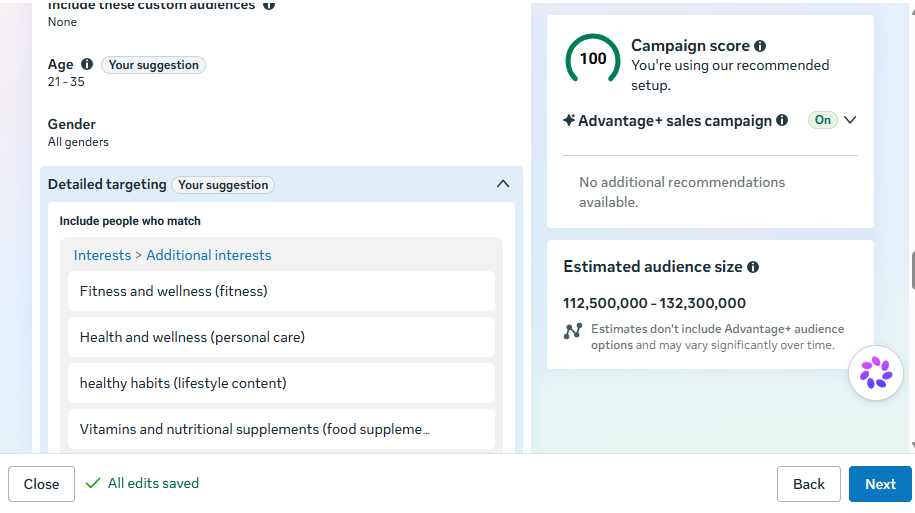
Example:
Business: Online fitness coaching
Possible targeting:
- Location: Mumbai
- Age: 22–40
- Interests: Fitness, gym, weight training, healthy lifestyle
This gives you a starting audience to test.
However, do not assume that adding more interests will automatically improve results.
B. Custom Audience
Custom Audience is used to reach people who have already interacted with your business.
This is particularly useful because these people are already familiar with your brand.
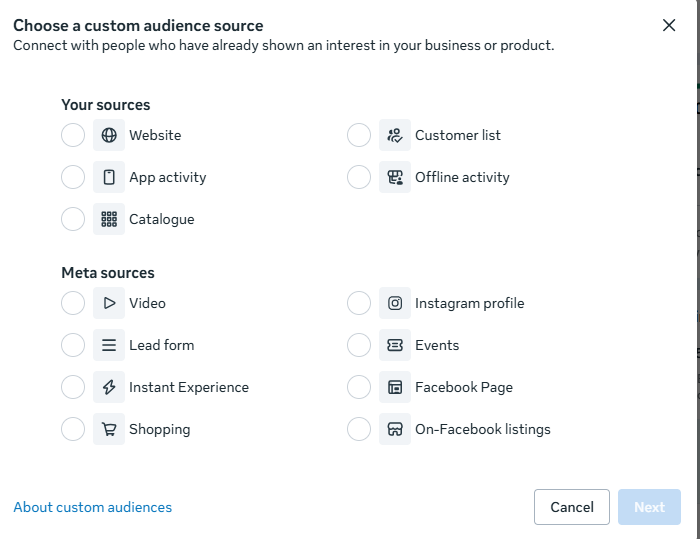
You can create Custom Audiences using:
- Website visitors
- Instagram account engagement
- Facebook page engagement
- Customer lists
- Video viewers
- People who interacted with lead forms
- App activity
Example:
Imagine you run an online clothing store.
A customer visits your website, checks a product, but does not purchase.
You can create a Custom Audience of website visitors and show them another advertisement featuring the product, customer reviews, or a special offer.
This strategy helps bring interested visitors back to your website.
C. Lookalike Audience
Lookalike Audience helps you find new people who share characteristics with an existing source audience.
For example, you can use your existing customer list as a source and create a Lookalike Audience.
Meta then looks for people who resemble the source audience based on available signals.
Example:
Suppose your online store has 1,000 previous customers.
You can create a Lookalike Audience using those customers as the source.
Meta can use this information to identify potential new customers.
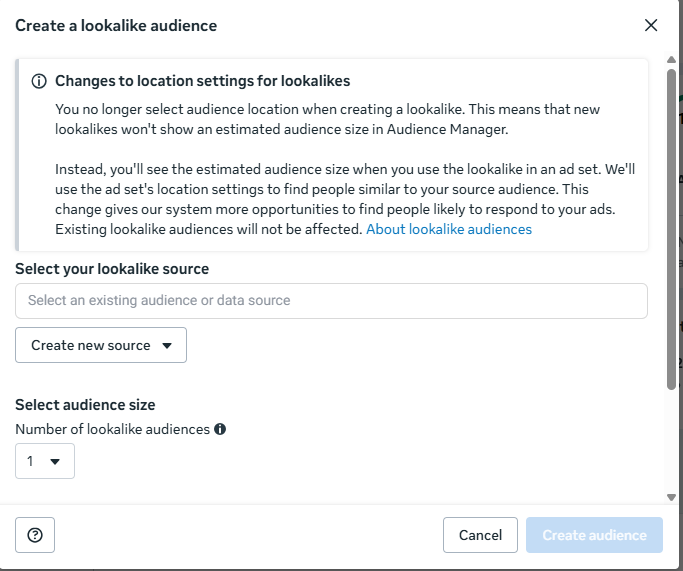
Lookalike Audiences can be useful for customer acquisition, particularly when your source data is relevant and sufficiently representative.
D. Advantage+ Audience
Advantage+ Audience uses Meta’s machine learning to help identify people who are likely to take your desired action.
You can provide audience suggestions, such as interests, custom audiences, and demographic information, while Meta can expand beyond those suggestions.
This is important because modern Meta advertising relies heavily on machine learning.
Instead of manually controlling every audience detail, advertisers can give Meta useful signals and allow its system to find potential customers.
Example:
Suppose you sell organic food products online.
You can provide relevant audience suggestions such as organic food, healthy eating, and natural products.
Meta can use these suggestions as guidance while finding people who are more likely to purchase.
Note: Advantage+ Audience features and available controls can vary depending on campaign objective and account setup.
4. How to Create an Audience in Meta Ads Manager
Let’s understand the practical process.
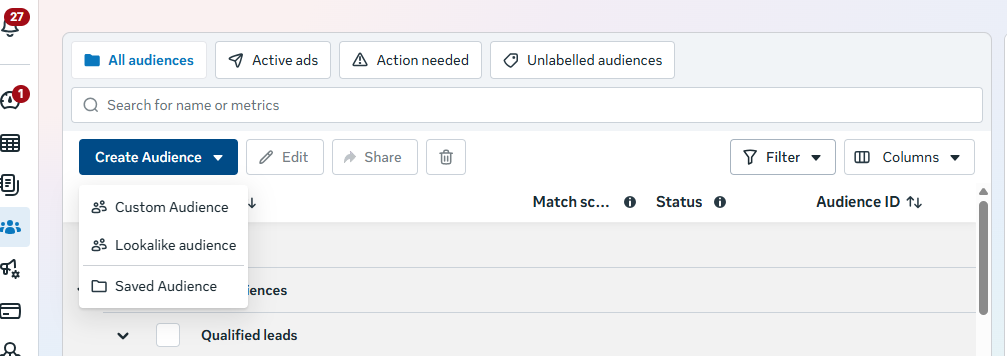
Follow these steps:
Step 1: Open Meta Ads Manager
Log in to your Meta Ads Manager and open the Audiences section.
Step 2: Click Create Audience
You will find different audience creation options, including Custom Audience and Lookalike Audience.
Step 3: Select Your Audience Type
Choose the audience based on your campaign objective.
For example:
- New customers: Core or Advantage+ Audience
- Website visitors: Custom Audience
- Existing customers: Customer list Custom Audience
- Similar potential customers: Lookalike Audience
Step 4: Add Audience Details
Depending on your selected audience type, add relevant information such as location, interests, website activity, or customer data.
Step 5: Save Your Audience
Give your audience a clear name so you can identify it when creating campaigns.
For example:
Mumbai | Website Visitors | 30 Days
Step 6: Use It in Your Ad Set
Select the saved audience where applicable and configure your remaining campaign settings.
5. Practical Example: Audience Targeting for an eCommerce Brand
Let’s take a real-world business example.
Suppose you own an online brand selling ghee, raw honey, and cold-pressed oils.
Your objective is to generate website purchases through Meta Ads.
Instead of creating one audience and expecting it to deliver all your sales, you can test different audience strategies.
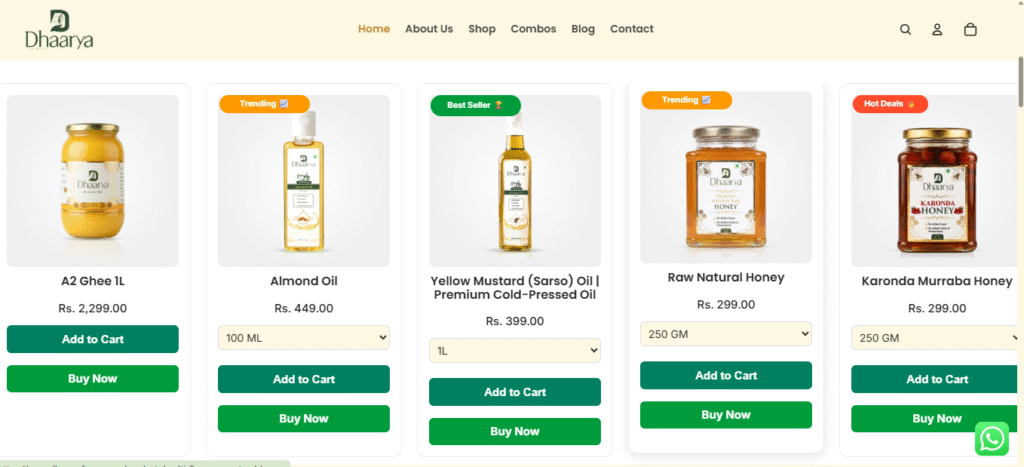
Here is how I would structure the audience testing.
| Audience | Targeting strategy | Purpose |
|---|---|---|
| Audience A | Broad audience | Find new customers |
| Audience B | Relevant food and organic product interests | Test interest-based acquisition |
| Audience C | Website visitors | Retarget interested visitors |
| Audience D | Existing customers | Generate repeat purchases |
| Audience E | Lookalike of purchasers | Find potential new buyers |
Example campaign structure:
Assume your daily advertising budget is ₹1,000.
You can start by testing a new customer acquisition campaign and a separate retargeting campaign, allocating the budget based on audience size, available traffic, and previous conversion data.
For new customers, test broad targeting against relevant interest suggestions.
For retargeting, show different creatives to:
- People who viewed products.
- People who added products to their cart.
- People who initiated checkout.
- People who visited the website but did not purchase.
Make sure to exclude recent purchasers from acquisition campaigns where appropriate.
What creatives should you show?
For new audiences:
- Product demonstration videos.
- Product benefits.
- Brand introduction.
- Educational content.
For retargeting audiences:
- Customer testimonials.
- Product reviews.
- Product benefits.
- Relevant combo offers.
- Purchase reminders.
The important point is that different audiences may need different advertising messages.
6. Which Audience Targeting Strategy Works Best in Meta Ads?
There is no single audience strategy that works for every business.
It depends on your product, industry, conversion history, budget, and customer behaviour.
Here is how I generally approach audience selection.
| Business type | Audience strategy to test |
|---|---|
| New eCommerce brand | Broad and interest-based |
| Established eCommerce brand | Broad, Advantage+ and purchaser-based Lookalikes |
| Local service business | Location-based targeting and relevant audience signals |
| B2B business | Relevant professional and business audience signals |
| Education business | Broad and relevant interest-based audiences |
| Existing brand | Broad acquisition and Custom Audience retargeting |
One important thing: Do not create too many ad sets with small budgets.
If you divide a limited budget across 10 different audiences, each audience may receive insufficient data to produce meaningful results.
Start with a manageable number of tests and make decisions based on actual campaign performance.
7. Common Audience Targeting Mistakes in Meta Ads
Even experienced advertisers sometimes make these mistakes.
1. Selecting too many interests
Adding 20–30 unrelated interests does not mean you will reach better customers.
Choose relevant signals and test them properly.
2. Ignoring broad targeting
Some advertisers believe that manually selecting interests is always better.
But Meta’s algorithm can sometimes find customers more effectively using broader targeting.
3. Not using Custom Audiences
If people have already visited your website or interacted with your Instagram account, ignoring these audiences means missing retargeting opportunities.
4. Mixing existing customers with new customer acquisition
If your objective is to acquire new customers, monitor whether existing customers are taking up a significant share of your campaign results.
5. Making decisions too early
Do not stop an audience simply because it does not generate purchases in the first few hours.
Evaluate performance using sufficient data and consider your budget, conversion cycle, and sales volume.
6. Ignoring creative performance
Sometimes the problem is not audience targeting.
Your audience may be relevant, but your advertisement might not communicate the product’s value clearly.
8. How to Improve Audience Targeting Performance
If your Meta Ads campaigns are not generating good results, I recommend checking these areas before changing the audience.
- Check conversion tracking: Ensure Meta Pixel and your conversion events are working correctly.
- Review audience overlap: Avoid unnecessary duplication across multiple ad sets.
- Test different creatives: Compare videos, images, carousels, and product demonstrations.
- Analyse purchase data: Identify which audiences are generating actual customers, not just clicks.
- Use CRM data: Where appropriate, upload customer data to build relevant Custom Audiences and Lookalikes.
- Review landing pages: Make sure the website experience matches the advertisement.
- Track business results: Evaluate cost per purchase, revenue, ROAS, and customer quality.
The biggest mistake is optimising campaigns only for cheap clicks or low-cost traffic.
A campaign generating 100 website visitors with zero purchases is not necessarily better than a campaign generating 30 visitors and five purchases.
Always connect advertising performance with actual business results.
9. Final Thoughts
Audience targeting in Meta Ads is not just about selecting interests, age groups, and locations.
It is about understanding your customers, identifying their behaviour, and giving Meta the right information to find people who are likely to take action.
For a new business, broad and interest-based audience testing can provide useful starting points.
For an established business, website visitors, customer lists, purchase data, and Lookalike Audiences can support customer acquisition and retention.
But remember one thing:
The right audience can bring attention to your business. The right offer, creative, and customer experience help convert that attention into revenue.
If you want better results from Meta Ads, focus on the complete advertising system rather than audience targeting alone.
