

Meta Ads help businesses reach people on Facebook, Instagram, Messenger and other Meta platforms. Whether you want more website visitors, leads, sales or brand awareness, Meta advertising gives you different ways to connect with potential customers.
But before launching your first campaign, it’s important to understand how Meta Ads work and what each setting in Ads Manager means.
Let’s understand everything step by step.
1. What Is Meta Ads Manager?
Meta Ads Manager is the platform where you create, manage and monitor paid advertising campaigns on Facebook and Instagram.
You can use it to:
- Create advertising campaigns.
- Select your campaign objective.
- Choose your target audience.
- Set your advertising budget.
- Upload images, videos and other creatives.
- Select where your ads will appear.
- Track campaign performance.
- Optimise campaigns based on results.
For example, if you own a clothing store and want more people to purchase from your website, you can use Meta Ads Manager to create a sales campaign and show your products to potential customers.
2. How Does Meta Advertising Work?
Meta advertising works by showing your ads to people who are likely to be interested in your products or services.
You first decide what you want to achieve, such as generating leads, increasing website traffic or getting purchases.
Then you select your audience, budget, ad format and placements.
Meta uses its advertising system to decide which ads to show to people based on factors such as audience signals, estimated action rates and ad quality.
For example:
Imagine you run a skincare brand.
You want to sell a new face serum. You create a sales campaign, upload a product video, select your target audience and set your budget.
Meta then delivers your ad to people who may be interested in skincare products. When someone clicks the ad, they can visit your website and purchase the serum.
3. Understanding the Three Levels of Meta Ads
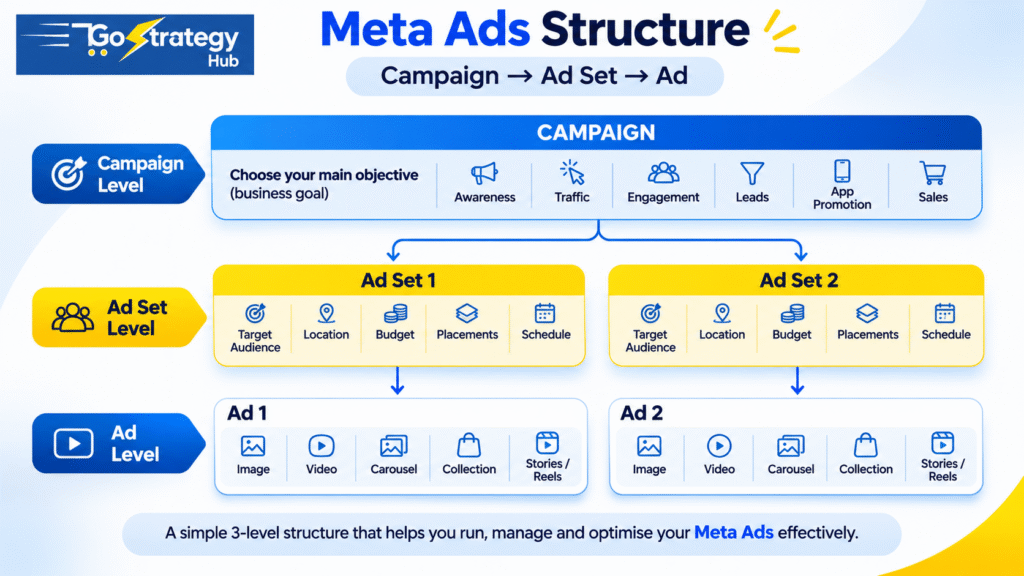
Every Meta advertising campaign has three main levels.
1. Campaign Level
This is where you decide your main advertising objective.
For example:
- Awareness
- Traffic
- Engagement
- Leads
- App promotion
- Sales
2. Ad Set Level
This is where you decide who should see your ads and how they should be delivered.
You can manage:
- Audience targeting
- Budget and schedule
- Placements
- Conversion location
- Performance goal
3. Ad Level
This is where you create the actual advertisement.
You can add:
- Images or videos
- Primary text
- Headline
- Description
- Call-to-action button
- Website or destination link
In simple words, the campaign decides your goal, the ad set decides who sees your ads and how they are delivered, and the ad level decides what people see.
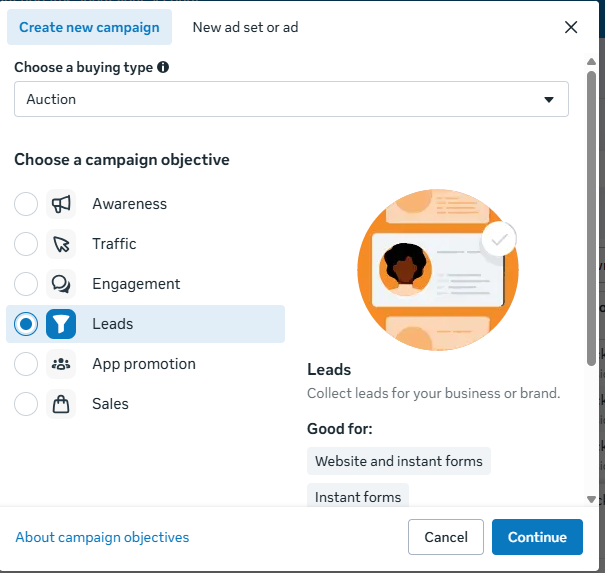
4. What Are the Six Meta Ads Campaign Objectives?
Meta provides six main campaign objectives. Each objective is designed for a different business goal.
1. Awareness
Use this objective when you want more people to know about your business, brand or product.
Example: A new clothing brand wants to introduce itself to more people.
2. Traffic
Use this objective when you want people to visit a destination, such as your website, landing page or app.
Example: You want more visitors to read your latest blog.
3. Engagement
Use this objective when you want people to interact with your content or business.
Example: You want more video views, post engagement or messages.
4. Leads
Use this objective when you want to collect potential customer information or encourage people to contact your business.
Example: A real estate company wants enquiries from people interested in buying properties.
5. App Promotion
Use this objective when you want more people to install or take action inside your mobile application.
Example: A fitness app wants to increase app installations.
6. Sales
Use this objective when you want people to purchase products or complete valuable actions on your website, app or other supported destinations.
Example: An online store wants more product purchases.
Important: Choose your campaign objective according to your actual business goal, not just because one objective appears cheaper.
5. What Are the Different Types of Meta Ad Creatives?
Ad creatives are the images, videos and other visual content people see in your advertisements.
Your creative plays an important role in attracting attention and communicating your offer.
Common Meta ad formats include:
- Image Ads: Single images used to promote products, services or offers.
- Video Ads: Videos that demonstrate products, explain services or tell a brand story.
- Carousel Ads: Multiple images or videos that people can swipe through.
- Collection Ads: A format that combines a main visual with a selection of products for shopping experiences.
- Stories and Reels Ads: Vertical creative formats designed for full-screen viewing.
For example, a skincare brand can use a product image to highlight an offer, a video to demonstrate how the product works and a carousel to showcase different products.
6. Where Can Meta Ads Appear? Understanding Ad Placements
Placements are the locations where your advertisements appear across Meta platforms.
Some common placements include:
- Facebook Feed
- Facebook Stories
- Facebook Reels
- Facebook Marketplace
- Facebook Video Feeds
- Instagram Feed
- Instagram Stories
- Instagram Reels
- Instagram Explore
Other placements
- Messenger
- Meta Audience Network
- Threads, where supported
You can select placements manually or use Advantage+ Placements, which allows Meta to distribute your ads across eligible placements.
Your creative should also match the placement. For example, vertical videos are generally suitable for Stories and Reels.
7. What Is Audience Targeting in Meta Ads?
Audience targeting helps you decide which people should see your advertisements.
Meta provides different ways to define your audience.
Location: Target people based on selected locations, such as a city, state or country.
Age and Gender: Set demographic preferences where these options are available and permitted.
Detailed Targeting: Use available interests, behaviours and demographic information to define an audience.
Broad Audience: Allow Meta to find potential customers without adding many targeting restrictions.
Advantage+ Audience: Provide audience suggestions and allow Meta’s delivery system to find people who are likely to respond to your campaign.
For example, a business selling gym equipment may start with an audience interested in fitness and home workouts. It can also test broader audience settings to compare results.
Remember, selecting the right audience is important, but your offer, creative and landing page also affect campaign performance.
8. What Are Custom Audiences and Lookalike Audiences?
Meta provides two useful audience options for reaching people who already know your business and finding new potential customers.
Custom Audiences
A Custom Audience is created using people who have already interacted with your business.
You can create audiences from sources such as:
- Website visitors
- Existing customers
- People who viewed specific products
- People who added products to their cart
- Instagram and Facebook engagers
- Video viewers
- Customer lists
For example, if someone visits your website and views a product but doesn’t purchase, you can create a Custom Audience and show them a relevant advertisement later.
This is called remarketing.
Lookalike Audiences
A Lookalike Audience helps you reach new people who share similarities with an existing audience.
For example, you can use your existing customer list as a source audience. Meta can then find other people with similar characteristics.
Custom Audiences help you reach people who already know your business, while Lookalike Audiences help you find new potential customers.
9. How Does Meta Ads Budgeting Work?
Your advertising budget determines how much you want to spend on your campaigns.
Meta offers two common budget types.
Daily Budget
A daily budget is the average amount you want to spend per day.
Example: You set a daily budget of ₹500 for your campaign.
Lifetime Budget
A lifetime budget is the total amount you want to spend during the selected campaign period.
Example: You set a lifetime budget of ₹10,000 for a campaign running for 20 days.
You can also manage budgets at different levels.
- Ad Set Budget: You control the budget for individual ad sets.
- Advantage+ Campaign Budget: You set a campaign-level budget and allow Meta to distribute it across eligible ad sets.
Meta also provides different bid strategies, such as Highest Volume, Cost Per Result Goal and Bid Cap. These options help control how Meta bids in the advertising auction.
10. What Is Advantage+ in Meta Ads?
Advantage+ is Meta’s collection of automation features designed to help advertisers improve campaign delivery and reduce manual work.
Depending on the campaign and available settings, Advantage+ can help with:
- Audience targeting
- Ad placements
- Campaign budget distribution
- Creative enhancements
- Sales campaign automation
For example, Advantage+ Placements can automatically distribute your ads across eligible placements instead of requiring you to select each placement manually.
Advantage+ Sales campaigns also use automation to help find potential customers and optimise delivery towards sales.
Automation can be useful, but it doesn’t replace good marketing strategy. Your creative, offer, product, website and tracking still matter.
11. What Is the Meta Ads Auction?
Meta uses an advertising auction to decide which advertisements are eligible to appear to people.
When multiple advertisers want to reach similar audiences, Meta evaluates different factors to determine which ads should be shown.
Some important factors include:
- Advertiser Bid: How much an advertiser is willing to bid for the desired result.
- Estimated Action Rate: How likely Meta predicts someone is to take the desired action.
- Ad Quality: The overall quality and relevance of the advertisement.
This means the advertiser with the highest bid doesn’t automatically win every auction.
An advertisement with relevant content and a better predicted response can also perform well.
12. What Are Meta Pixel and Conversions API?
Meta Pixel and Conversions API help businesses track customer actions and measure advertising performance.
Meta Pixel
Meta Pixel is a tracking code installed on your website. It helps share website activity with Meta.
Some common events include:
- PageView
- ViewContent
- AddToCart
- InitiateCheckout
- Purchase
- Lead
- CompleteRegistration
For example, when someone visits your product page, Meta Pixel can record a ViewContent event.
When someone completes a purchase, it can record a Purchase event.
Conversions API (CAPI)
Conversions API allows businesses to send conversion information directly from their server or supported integration to Meta.
It can help improve the reliability of conversion measurement when browser-based tracking is limited.
Why Are Both Important?
Meta Pixel collects browser events, while Conversions API can send events from the server or supported integrations.
When both send the same conversion, proper event deduplication is important to prevent the same purchase from being counted twice.
You can check your event activity and tracking diagnostics in Meta Events Manager.
13. How to Create Your First Meta Ads Campaign
Now that you understand the main features, let’s look at how to create your first campaign.
Step 1: Open Ads Manager
Log in to your Meta Business account and open Ads Manager.
Step 2: Click Create
Click the Create button to start a new advertising campaign.
Step 3: Select Your Objective
Choose the objective according to your business goal, such as Awareness, Traffic, Engagement, Leads, App Promotion or Sales.
Step 4: Set Up Your Campaign
Enter your campaign name and review the available campaign settings.
Step 5: Configure Your Ad Set
Select the conversion location, performance goal, audience, budget, schedule and placements according to your campaign objective.
Step 6: Create Your Ad
Choose your Facebook Page and Instagram account. Upload your image or video, write your primary text and headline, select a call-to-action button and add your destination link.
Step 7: Preview Your Advertisement
Check how your ad looks across different placements. Make sure your text, image, video and landing page are correct.
Step 8: Publish Your Campaign
Click Publish. Meta will review your advertisement before it starts running.
Once approved, monitor its performance regularly.
14. Important Meta Ads Metrics You Should Understand
After launching your campaign, you need to understand the numbers in Ads Manager.
Here are some important metrics every beginner should know.
| Metric | What Does It Mean? |
|---|---|
| Impressions | Total number of times your ad was displayed |
| Reach | Number of unique people who saw your ad |
| Frequency | Average number of times each person saw your ad |
| CPM | Cost per 1,000 impressions |
| CPC | Cost per click |
| CTR | Percentage of impressions that resulted in clicks |
| Link Clicks | Number of clicks on your advertisement’s link |
| Landing Page Views | Number of times people loaded your landing page |
| Leads | Number of leads generated |
| CPL | Cost per lead |
| Purchases | Number of purchases attributed to your ads |
| CPA | Cost per acquisition or desired action |
| ROAS | Return on advertising spend |
Don’t judge a campaign using only one metric.
For example, a campaign may generate cheap clicks but very few purchases. In that situation, you should also check landing page performance, audience quality, offer and conversion tracking.
15. How to Optimise Meta Ads Campaigns
Launching a campaign is only the beginning. You also need to review its performance and make improvements.
Here are some important areas to check.
1. Check Your Campaign Objective
Make sure your campaign objective matches your actual business goal.
If you want website purchases, don’t judge success only by engagement or traffic.
2. Review Audience Quality
Check whether your advertisements are reaching people who are genuinely interested in your product or service.
3. Test Different Creatives
Try different images, videos, hooks, offers and messages. Sometimes a new creative can improve campaign performance without changing the audience.
4. Improve Your Landing Page
Your advertisement may attract people, but your landing page needs to convince them to take action.
Check page speed, product information, pricing, reviews and the checkout process.
5. Check Conversion Tracking
Make sure important events such as Lead and Purchase are being recorded correctly.
Incorrect tracking can lead to misleading campaign reports.
6. Monitor Frequency and Creative Fatigue
If people keep seeing the same advertisement, they may lose interest. Review frequency and audience response, and refresh creatives when needed.
7. Avoid Making Too Many Changes Together
Don’t change the audience, budget, creative and campaign settings all at once. Review performance and make controlled changes so you can understand what is improving or affecting results.
Final Thoughts
Meta Ads are more than just running advertisements on Facebook and Instagram. You need to understand campaign objectives, audience targeting, creatives, placements, budgets and conversion tracking.
If you are a beginner, start with one clear business goal, create a well-planned campaign and monitor the results regularly.
Most importantly, remember that successful advertising is not only about getting clicks. It’s about reaching the right people, communicating the right offer and turning interested visitors into actual customers.
